
Smart Solar Devices: How to Run More of Your Home on Your Own Solar Power
Last checked: October 31, 2026. Product details and prices come from the makers’ own pages on that date. We haven’t tested these devices ourselves, and we don’t currently earn anything from the links in this guide (affiliate disclosure).
Solar panels make the most power around midday, which is usually when nobody is home to use it. Whatever your house doesn’t use at that moment flows out to the grid. In many countries you’re paid far less for that exported electricity than you pay to buy it back in the evening, and in some you’re paid nothing at all. That gap is the whole business case for smart solar devices: gadgets that notice when you’re exporting and switch something useful on instead.
This guide explains how that works, which kinds of device do it, real examples from myenergi, Ohme, Wallbox, Shelly, TP-Link Tapo, Home Assistant and Homey, and how to tell whether any of it will pay off in your home.
What “solar-aware” actually means
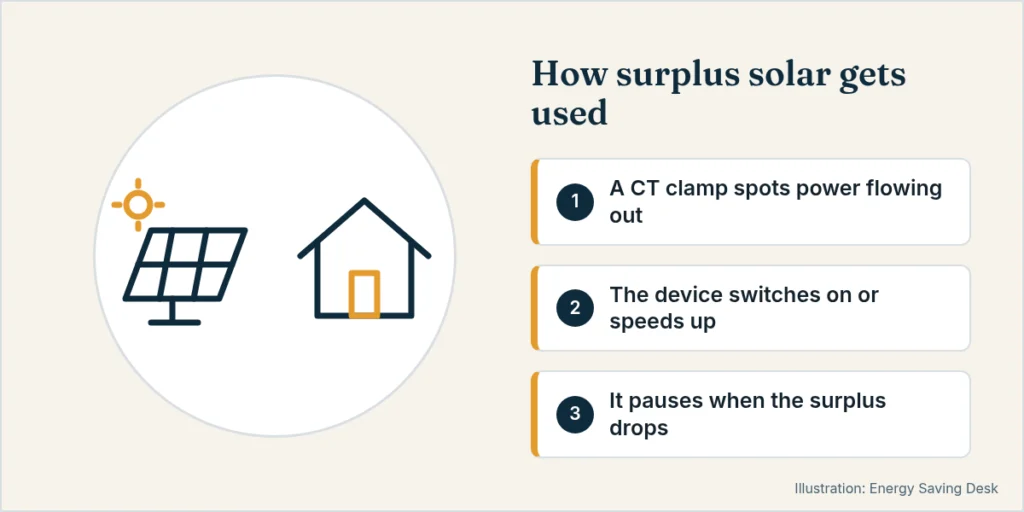
A normal timer switches a device on at a fixed time. A solar-aware device switches on, or speeds up, when there is surplus: solar power that your home isn’t using right now and would otherwise export.
To do that, the device needs to know two things in real time:
- How much you’re generating, from your inverter or a sensor on the solar cable.
- Whether power is flowing in from the grid or out to it, measured where the mains cable enters your home.
The second one is the key measurement. If the meter point shows 1.5 kW flowing out, you have 1.5 kW to spare. If it shows power flowing in, there’s no surplus and the device should back off.
How excess-solar detection works: CT clamps and export sensing
Almost every system on this page uses a CT clamp (current transformer). It’s a small sensor that clips around the live mains cable near your meter. It doesn’t cut into the cable. It reads the current flowing through it and, together with the voltage, the direction. That’s how the device can tell import from export.
- myenergi’s zappi EV charger ships with a CT clamp and 5 m cable in the box (three clamps on the three-phase model), according to myenergi.
- Ohme says a CT clamp is “essential” for its solar charging and should sit on the incoming live cable as close to the meter as possible, with the arrow pointing towards the house.
- Wallbox’s solar charging needs a Wallbox energy meter installed, and Wallbox notes that your inverter has to be set to export mode.
- Energy meters such as the Shelly EM Gen3 (single phase, up to two clamps, 50 A clamp included) do the same job for a home automation system rather than for one appliance.
Some setups read the data from your inverter, home battery or smart-meter dongle instead of a clamp. The principle is the same: no reliable live import/export reading means no reliable solar switching.
A safety note: fitting a clamp means opening your consumer unit or electrical panel, which exposes live parts. Have a qualified electrician do it unless you’re qualified yourself.
Why the magic number is about 1.4 kW for EV charging
EVs can’t charge on a trickle. The charging standard needs a minimum of 6 A, which works out at roughly 1.4 kW on a single-phase supply. myenergi, Ohme and Wallbox all build their solar modes around that floor:
- Surplus only: wait until about 1.4 kW of spare solar is available, then charge, and pause when a cloud passes.
- Solar plus a grid top-up: start with less surplus and let the grid make up the difference, so the car keeps charging on cloudy days.
On three-phase supplies the minimum is three times higher. Wallbox gives about 4,140 W for its “Full green” mode on three phases, so a three-phase charger only solar-charges with a fairly large array.
The main types of smart solar device
1. Solar diverters for hot water (myenergi eddi)
A solar diverter sends surplus power to the immersion heater in a hot water cylinder. Water is a great battery: it stores heat for hours and you need it every day.
The myenergi eddi is the best-known example in the UK. According to myenergi, it:
- decides every second or so where surplus generation should go, and diverts it into the property instead of exporting it;
- can heat water from less than 1 kW of surplus, because an immersion heater can be varied smoothly. Heat pumps and EV chargers usually need around 1.4 kW before they start;
- can switch between heating appliances depending on generation and tank temperature, and work alongside a heat pump by trickle-heating water when the heat pump isn’t running;
- connects over Wi-Fi or Ethernet, and works with myenergi’s home battery and zappi EV charger;
- comes with a 3-year warranty. An eddi+ version can divert up to 9 kW into a three-phase heating element.
How much energy is that? Heating water takes about 1.16 Wh per litre per °C. Warming a 150-litre cylinder from 15 °C to 55 °C needs roughly 150 × 40 × 1.16 ≈ 7 kWh. On a sunny day, a diverter can absorb most of that from surplus that would otherwise have been exported. On a dull winter day it might manage very little, and your boiler, heat pump or timed immersion takes over.
2. Solar-aware EV chargers (myenergi zappi, Ohme, Wallbox)
An EV battery is by far the biggest flexible load in most homes, so a charger with a solar mode can soak up a lot of surplus.
myenergi zappi (from £779 including VAT on myenergi’s UK site, 7 kW single-phase or 22 kW three-phase, tethered or untethered, 3-year warranty) has three modes:
- FAST: full speed, grid or solar.
- ECO: follows the surplus but keeps charging at the 1.4 kW minimum, topping up from the grid when needed.
- ECO+: charges from surplus and pauses when there isn’t enough. A Minimum Green Level setting from 1% to 100% decides how much of that 1.4 kW minimum must be surplus. At 100% it waits for about 1,400 W of spare solar. At 50% it starts with about 700 W and takes the other 700 W from the grid or a battery. myenergi stresses that this is a floor, not a fixed split: with 2,000 W of surplus, the car takes 2,000 W of surplus and no grid power.
Ohme Home Pro (from £999 including standard installation in the UK, 7.4 kW, 3-year warranty) offers two solar options in its app:
- Solar Boost works towards a charge target and ready-by time with a mix of solar and grid, using any surplus along the way.
- Solar Only charges only when at least 1.44 kW of surplus is available.
Ohme says solar charging is available on most Home Pro and ePod chargers installed from January 2023 onwards with a working CT clamp. If the surplus drops, it keeps going on grid power for about 15 seconds, then pauses for five minutes.
Wallbox Pulsar Plus (from $649.99 in the US, up to 11.5 kW) supports Solar Charging with a Wallbox Power Meter ($299 on Wallbox’s US site). It has two modes:
- Eco mode can start with about 460 W of surplus on single phase and blend in grid power.
- Full green waits for about 1,380 W of surplus on single phase.
Charging starts about two minutes after enough surplus appears and pauses after 30 seconds without it. Wallbox says solar charging doesn’t work with multiple-charger installations, and that manual and scheduled charges override it.
One trap with all three: a solar mode can’t always tell solar power from battery power. Ohme warns that if your home battery is set to discharge while the car is plugged in, the car may drain it. myenergi and Wallbox give similar warnings. The fix is a small export margin (myenergi suggests starting at 50 W) and a surplus-only setting, or telling the battery not to discharge into the car.
3. Smart plugs with energy monitoring (Shelly, TP-Link Tapo)
Smart plugs are the cheapest way into solar automation. You can run a dehumidifier, pool pump, electric bike charger or water heater on a plug from midday surplus. Two things matter: the plug must measure power, and it must work with whatever gives it the surplus signal.
- Shelly Plug US Gen4 ($24.99 on Shelly’s US store, 15 A / 1,800 W) has power metering, local schedules and scripting, and works with Wi-Fi, Bluetooth, Zigbee, Matter and Home Assistant. In Europe, the Shelly Plug S Gen3 (12 A / 2,500 W, power metering, Matter) was still listed on Shelly’s site on October 31, 2026, but marked as discontinued, so check what has replaced it locally.
- TP-Link Tapo P110 (UK, 13 A max) adds energy monitoring, schedules and timers through the Tapo app. TP-Link says it’s not for EV charging, and to avoid appliances with motors or compressors above 1/6 HP, such as air conditioners.
On its own, a plug only knows what its appliance uses, not what your house is exporting. To make it solar-aware, pair it with a whole-home meter and an energy manager (next section). Shelly’s own route is a Shelly energy meter with local scripts or webhooks: Shelly describes using its meters to “set exact parameters for heating, cooling, or electric vehicle charging based on PV production” without a cloud.
Don’t put heaters or kettles on a plug unless it’s rated for the load, and don’t use plugs for anything that must never switch off by surprise, such as a fridge or medical equipment.
4. Energy managers (Home Assistant, Homey)
An energy manager is the brain that joins everything up. It reads your solar output, your grid import or export and your battery level, then switches devices by rules you set.
- Home Assistant is free, open-source software. Its Energy dashboard combines grid use, solar production, home batteries and individual devices from many brands, so you aren’t locked into one ecosystem. You write automations such as “if export is above 1,500 W for 5 minutes, turn on the dehumidifier plug”.
- Homey (Homey Pro $449, Homey Pro mini $249, or the Homey Cloud app on Homey’s US site) has built-in Homey Energy features. These include Flow cards such as “Solar power exceeds 600 W” or “Solar power becomes greater than 800 W for 5 minutes”, dynamic-price triggers, and a list of your top energy consumers.
The advantage is flexibility: one system can run a diverter, a charger and a dozen plugs in priority order. The downside is setup time. Home Assistant in particular rewards people who enjoy tinkering.
5. Home batteries
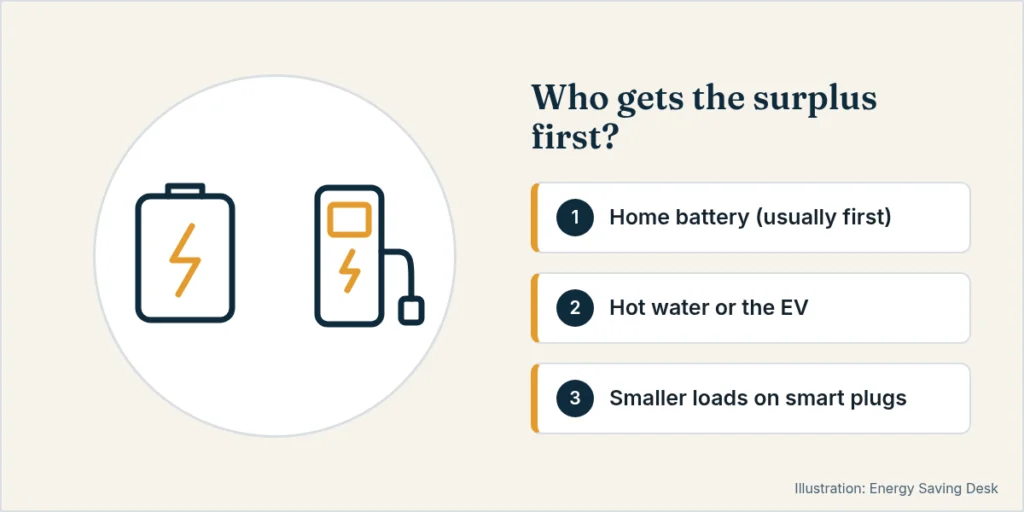
A home battery is the most automatic solar device of all. It charges from surplus during the day and discharges in the evening without any rules from you. It also competes with everything above for the same surplus, so decide the order:
- Battery first, then diverter or car. This is the usual choice where exports pay little and evening imports are expensive.
- Car or hot water first, then battery. This makes sense when the battery is small or the car needs the miles.
myenergi says the eddi and zappi work with its own battery as well as third-party batteries if you set an export margin. For sizing and payback, see our home battery payback calculator and, for the UK, our guide to the best home batteries for solar.
Comparison: which smart solar device does what
| Device type | Example (maker) | What it uses surplus for | Minimum surplus to start | Needs CT clamp or meter? | Price on maker’s site (Oct 31, 2026) |
|---|---|---|---|---|---|
| Solar diverter | myenergi eddi | Hot water cylinder (immersion) | Under 1 kW | Yes | Not listed on product page |
| Solar EV charger | myenergi zappi | EV battery | ~1.4 kW (ECO+ at 100% MGL), less with grid top-up | Yes (included) | From £779 |
| Solar EV charger | Ohme Home Pro | EV battery | 1.44 kW (Solar Only), 0.72 kW with grid top-up | Yes | From £999 incl. standard install |
| Solar EV charger | Wallbox Pulsar Plus | EV battery | ~1,380 W (Full green), ~460 W (Eco) | Wallbox Power Meter | From $649.99 + $299 meter |
| Smart plug | Shelly Plug US Gen4 | Plug-in appliances up to 1,800 W | Set by your rules | Needs a whole-home meter for solar logic | $24.99 |
| Smart plug | TP-Link Tapo P110 | Plug-in appliances (13 A max) | Set by your rules | Needs a whole-home meter for solar logic | Not checked |
| Energy meter | Shelly EM Gen3 | Measures import and export for automations | – | It is the meter (50 A clamp included) | €58.90 |
| Energy manager | Home Assistant / Homey | Coordinates all of the above | Set by your rules | Uses your meter, inverter or dongle | Free (HA) / $249–449 (Homey Pro) |
| Home battery | Various | Stores surplus for the evening | Very little | Usually its own meter | See our battery guides |
Who smart solar devices pay off for
The value of each kilowatt-hour you divert is roughly what you’d pay to import it minus what you’d earn exporting it. If you’d earn almost as much exporting as you’d pay later, automation adds little. If export pays a fraction of the import price, every diverted kWh counts.
They tend to pay off when:
- You export a lot in spring and summer. A monitoring app or your inverter will show it.
- You have a big flexible load: an EV that’s often home in daylight, a hot water cylinder with an immersion heater, or a pool.
- Your export rate is low or zero compared with your import rate.
- You already own some of the kit. For example, your EV charger may only need a CT clamp, or a Home Assistant server may already be running.
They pay off less when:
- Your solar array is small and your daytime baseload already uses most of it.
- You have a combi boiler and no hot water cylinder, so there’s nothing for a diverter to heat.
- The car is at work all day, every weekday.
- You’re on a cheap overnight tariff that charges the car and heats the water for less than the export value of your solar. Ohme makes this point itself for dual-rate tariffs.
To put numbers on your own situation, start with our solar panel payback calculator to see how much you generate and export. Then use the Is switching worth it? calculator to compare a diverter or charger against what you do today.
Simple setup steps
- Measure first. Use your inverter app, smart meter data or an energy monitor for a couple of weeks to see when and how much you export.
- Pick the biggest useful load. For most homes that’s the EV or the hot water cylinder, not a smart plug.
- Check what you already have. Many recent EV chargers have a solar mode that only needs a CT clamp. Ask your installer, or look in the app settings.
- Get the clamp fitted properly by an electrician, on the incoming mains cable and pointing the right way. A clamp the wrong way round makes import look like export.
- Set priorities if you have a battery. Add a small export margin (myenergi suggests 50–100 W) and choose surplus-only modes so the car doesn’t drain the battery.
- Add smart plugs last, driven by an energy manager, for smaller loads that can run whenever the sun is out.
- Review after a month. Compare exports and bills before and after, and adjust thresholds.
For choosing the charger itself, including circuit sizing and smart-charging rules, see our home EV charger buying guide. If you’re considering a small system rather than a rooftop one, our guide to plug-in and balcony solar rules explains what’s allowed.
FAQ
Can a smart plug detect when my solar panels are exporting?
Not by itself. A smart plug measures only the appliance plugged into it. To switch on surplus, it needs a signal from a whole-home meter, inverter or energy manager such as Home Assistant or Homey.
Is a solar diverter worth it if I have a home battery?
Often yes, as a second step. Once the battery is full, a diverter like the eddi can still absorb surplus into hot water. Set an export margin so the diverter doesn’t take power the battery should have.
Why won’t my EV charge on solar when the panels are clearly producing?
Usually because the surplus is under about 1.4 kW on single phase. That’s the minimum EV charging rate, and your house may be using part of the solar output. Lower the surplus-only threshold, if your charger allows a grid top-up, or wait for brighter conditions.
Will solar charging drain my home battery?
It can. Ohme, myenergi and Wallbox all warn that their chargers can’t always tell battery power from solar. Use surplus-only modes with an export margin, or set the battery not to discharge into the car.
Do I need an electrician?
For CT clamps, diverters and EV chargers, yes. They involve your consumer unit or panel and fixed wiring. Smart plugs and software energy managers are DIY.
Does three-phase power change anything?
Yes. A three-phase EV charger needs about three times the surplus to start in surplus-only mode (about 4.1 kW for Wallbox’s Full green). Many three-phase homes therefore use a mix of solar and grid power, or a single-phase setting where the charger and car support it.
Related guides
- Best home energy monitors
- Home EV charger buying guide
- Best home batteries for solar in the UK
- Is solar still worth it without the tax credit?
More guides in Smart Energy & Monitoring.
Sources
All checked on October 31, 2026.
- myenergi eddi solar diverter: https://www.myenergi.com/eddi-power-diverter/
- myenergi zappi EV charger (price, modes, CT clamp in the box): https://www.myenergi.com/zappi-ev-charger/
- myenergi Help Centre, Minimum Green Level: https://support.myenergi.com/hc/en-gb/articles/15587880239249-What-is-the-Minimum-Green-Level-MGL
- myenergi Help Centre, using a third-party battery with myenergi devices: https://support.myenergi.com/hc/en-gb/articles/6778001879569-Using-a-3rd-party-battery-with-myenergi-devices
- Ohme, Solar Boost and Solar Only: https://ohme-ev.com/support/how-to-charge-with-solar-boost-and-solar-only/
- Ohme Home Pro (price, specs): https://ohme-ev.com/product/ohme-home-pro/
- Wallbox Help Center, Solar Charging activation and user guide (updated 25-09-2025): https://support.wallbox.com/en/knowledge-base/how-to-activate-and-use-eco-smart/
- Wallbox Pulsar Plus (US price, Power Meter): https://wallbox.com/en_us/pulsar-plus-ev-charger
- Shelly Plug US Gen4: https://us.shelly.com/products/shelly-plug-us-gen4-white
- Shelly Plug S Gen3 (listed as discontinued): https://www.shelly.com/products/shelly-plug-s-gen3
- Shelly EM Gen3: https://www.shelly.com/products/shelly-em-gen3
- Shelly Pro 3EM (PV-based local control): https://www.shelly.com/products/shelly-pro-3em-x1
- TP-Link Tapo P110: https://www.tapo.com/uk/product/smart-plug/tapo-p110/
- Home Assistant, home energy management: https://www.home-assistant.io/docs/energy/
- Homey Energy: https://homey.app/en-us/energy/