Smart Plugs That Switch On When the Sun Shines: Setup and What It Really Saves
Last checked: November 13, 2026. Product specs and prices come from the makers’ own pages on that date. The savings are our own worked examples with the assumptions labelled. We haven’t tested these plugs, and we don’t earn anything from the links in this guide (affiliate disclosure).
A smart plug costs about the same as a takeaway. Set up properly, it can run a dehumidifier, battery charger or other small load on solar power you would otherwise export. Set up badly, it clicks on and off every time a cloud passes, wears out its relay and saves almost nothing.
This guide covers what a solar-switching plug needs, which appliances suit it, a working Home Assistant automation with the logic explained, and honest savings maths for the UK, the Netherlands and the US.
If you’re new to solar automation, start with our overview of smart solar devices. This guide goes deeper on the plug part.
What a plug needs to react to the sun
A plug only knows what its own appliance uses. To switch on surplus solar, something else has to tell it how much power is flowing out of your home to the grid. That signal can come from:
- A whole-home meter with a clamp on the incoming cable, such as the Shelly EM Gen3, or a smart-meter reader like the Homey Energy Dongle
- Your inverter or home battery, if it reports grid export to your smart home system
- An energy manager such as Home Assistant or Homey, which reads that signal and switches the plug by your rules
Watch which signal you use. Homey’s built-in solar Flow cards, such as “Solar power becomes greater than 800 W for 5 minutes”, react to production. Production isn’t the same as surplus: if the oven is on, 800 W of solar may all be used already. Rules based on grid export are more accurate, because they account for everything else in the house.
Which appliances suit solar switching
The ideal load is flexible in time, modest in power and doesn’t mind being switched off at the wall.
| Appliance type | Good fit? | Why |
|---|---|---|
| Dehumidifier, in a garage or cellar | Good | Runs for hours, timing rarely matters. Check it restarts after power returns |
| E-bike, tool and laptop battery chargers | Good | Small loads that charge whenever powered |
| Portable power station (charging) | Good | Stores midday solar for the evening or for outages |
| Electric towel rail or small heater (thermostatic) | Fair | Must be within the plug’s rating; resistive loads are easiest |
| Washing machine, dishwasher | Poor | Most won’t start a programme when power comes back; use their delay-start instead |
| Fridge, freezer, medical equipment | Never | Must never switch off by surprise |
| Air conditioner, large compressors | Check | TP-Link says to avoid motors or compressors above 1/6 HP on the Tapo P110 |
| EV | Never on a plug | Use a solar-aware charger; TP-Link says the P110 doesn’t support EV charging |
Two plug ratings to know. Shelly’s Plug US Gen4 handles up to 15 A and 1,800 W, but its spec sheet says the 1,800 W maximum applies to resistive loads only. TP-Link’s Tapo P110 is rated 13 A maximum. Never plug a high-power heater into a plug that’s near its limit for hours at a time.
The setup that doesn’t chatter: two thresholds and a delay
The most common mistake is a single rule like “on when exporting, off when not”. It goes wrong like this: you export 300 W, the plug switches on a 250 W dehumidifier, export drops to 50 W, a cloud passes, you import for 20 seconds, the plug switches off, export jumps back… and so on all afternoon.
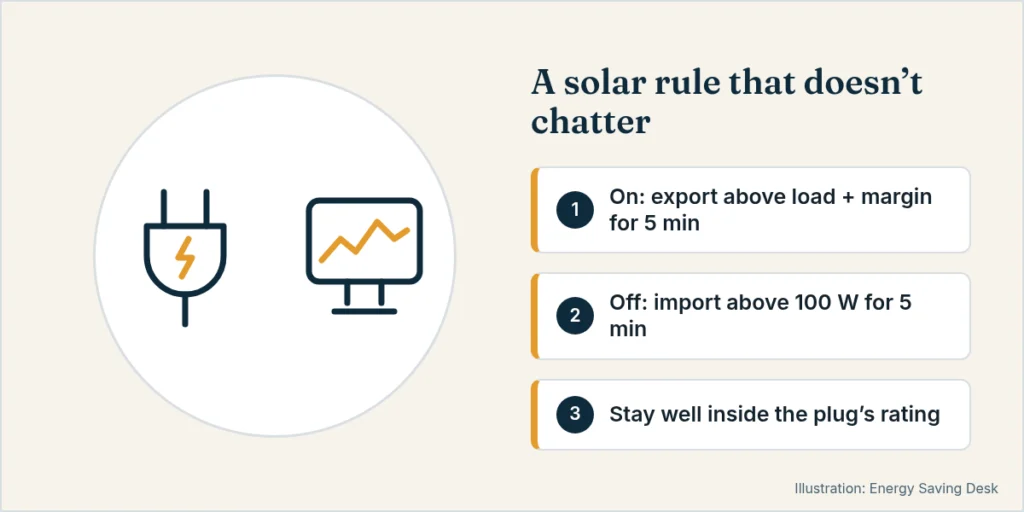
Use hysteresis: two different thresholds plus a time delay.
- Switch on when you’ve exported more than the appliance’s watts plus a margin, for 5 minutes. For a 250 W load, “exporting more than 400 W for 5 minutes”.
- Switch off only when you’ve been importing more than 100 W for 5 minutes.
Once the load is running, the export reading falls by about its own watts. That’s why the on-threshold must be higher than the load, and why the off-condition looks at importing, not “less export”.
This matters for hardware too. Shelly lists 10,000 switching cycles for the Plug US Gen4’s relay. At 2 cycles a day that’s over 13 years. At 20 cycles a day from a chattering rule, it’s under 18 months.
A Home Assistant example
This uses the current Home Assistant automation format (triggers: / actions:). Replace the two entity IDs with your own. Check your meter’s sign convention first: here, sensor.grid_power is negative when you export. Some integrations use the opposite.
alias: Dehumidifier on solar surplus
mode: single
triggers:
  - trigger: numeric_state
    entity_id: sensor.grid_power
    below: -400
    for: "00:05:00"
    id: surplus
  - trigger: numeric_state
    entity_id: sensor.grid_power
    above: 100
    for: "00:05:00"
    id: importing
actions:
  - choose:
      - conditions:
          - condition: trigger
            id: surplus
        sequence:
          - action: switch.turn_on
            target:
              entity_id: switch.dehumidifier_plug
      - conditions:
          - condition: trigger
            id: importing
        sequence:
          - action: switch.turn_off
            target:
              entity_id: switch.dehumidifier_plug
Two refinements worth adding:
- A time window (for example 10:00–16:00), so the rule doesn’t react to a brief spike at dawn
- A priority order if you have several plugs. Give each a higher on-threshold than the last, so the second only starts when there’s surplus left after the first
In Homey, the same logic is two Flows: one “when … for 5 minutes” Flow to turn the plug on and one to turn it off. Base both on your smart meter’s grid reading, not on solar production, if your setup allows it.
What it actually saves: worked examples
The value of each kWh you move into the sunny hours is:
Value per kWh = what you’d pay to import it − what you’d be paid to export it
Then take off the plug’s own use. Shelly lists the Plug US Gen4’s own consumption as under 1.5 W. At that maximum, it’s up to about 13 kWh a year (1.5 W × 8,760 hours).
Our example load: a 250 W dehumidifier running 4 hours a day on surplus for 150 days a year. That’s 150 kWh moved. These are assumptions: use your plug’s own power reading.
| Where | Import price | Export payment | Value per kWh | Yearly value (150 kWh) |
|---|---|---|---|---|
| Great Britain, Octopus Outgoing | 26.32p (price cap, Oct–Dec 2026) | 12p | 14.3p | ~£21 |
| Great Britain, no export tariff | 26.32p | 0p | 26.3p | ~£39 |
| Netherlands from 2027 (assumed 10 ct bare supply price) | ~23.2 ct incl. tax | ≥5 ct (legal minimum, before feed-in costs) | ~18 ct | ~€27 |
| US with full retail net metering | 18.16¢ (US average, Aug 2026) | 18.16¢ credit | ~0¢ | ~$0 |
| US with a 5¢ export credit (assumed) | 18.16¢ | 5¢ | 13.2¢ | ~$20 |
For the Dutch row, we added the 2026 energy tax of €0.09161/kWh and 21% VAT to the assumed 10 ct bare supply price. Dutch net metering ends on January 1, 2027, and until 2030 export payments must be at least 50% of the bare supply price.
Payback:
- If you already have a whole-home meter and an energy manager: a $24.99 Shelly Plug US Gen4 saving about $20 a year, less up to about $2.40 of its own power, pays back in roughly 18 months.
- If you’d have to buy the brains too: a Homey Pro mini ($249) plus one plug, for one dehumidifier, takes over 15 years to pay back. That isn’t worth it for one small load. It only makes sense if the hub also runs bigger loads, such as EV charging or a battery.
- With full retail net metering: there’s nothing to gain financially. Exported power is already worth as much as imported power.
Pros and cons
Pros
- Cheapest way into solar automation if you already measure grid export
- No electrician needed for the plug itself
- Works with appliances you already own
- Plug energy readings show you exactly what each appliance uses
Cons
- Small loads mean small savings, often £20–40 or €20–30 a year per plug
- Needs a whole-home signal. The meter clamp may need an electrician
- Many appliances don’t resume after power cuts, which limits the choice
- Poorly tuned rules wear out relays and can annoy everyone in the house
Who it’s not for
- Homes with full retail net metering. There’s no price gap to capture.
- Homes without solar monitoring that want only one automated plug. The hub costs more than the plug will ever save.
- Big loads. For hot water or EV charging, a solar diverter or solar-aware charger handles the power safely and adjusts smoothly, which a plug can’t.
FAQ
Can a smart plug detect solar export on its own?
No. A plug measures only its own appliance. It needs a grid-export reading from a meter, inverter or energy manager.
How much surplus do I need before switching on?
At least the appliance’s own power plus a margin of 100–200 W, for a few minutes. Check the appliance’s real draw with the plug’s power reading first.
Will switching an appliance at the plug damage it?
Resistive loads like heaters and chargers don’t mind. Compressors in dehumidifiers and air conditioners shouldn’t be cycled quickly, so use a minimum on-time and off-time and check the manual. TP-Link advises against compressors above 1/6 HP on its P110.
Is a plug worth it if I have a home battery?
Usually only after the battery is full, unless your battery is small. Set the plug’s on-threshold so it starts only when you’re still exporting with the battery charged.
Related guides
- Smart solar devices: run more of your home on your own solar
- Best home energy monitors
- How long will a power station run a refrigerator?
- How many solar panels do I need?
- Appliance running cost calculator
More guides in Smart Solar Devices.
Sources
All checked on November 13, 2026.
- Shelly Plug US Gen4 (price, 15 A / 1,800 W resistive, own consumption, 10,000 switching cycles): https://us.shelly.com/products/shelly-plug-us-gen4-white
- TP-Link Tapo P110 (13 A max, EV and compressor guidance): https://www.tapo.com/uk/product/smart-plug/tapo-p110/
- Shelly EM Gen3 (whole-home meter with clamp): https://www.shelly.com/products/shelly-em-gen3
- Homey Energy (Flow cards, Energy Dongle): https://homey.app/en-us/energy/
- Homey Pro mini ($249 list price): https://homey.app/en-us/homey-pro-mini/
- Home Assistant, automation triggers: https://www.home-assistant.io/docs/automation/trigger/
- Home Assistant, home energy management: https://www.home-assistant.io/docs/energy/
- Ofgem, price cap 1 October–31 December 2026: https://www.ofgem.gov.uk/news/changes-energy-price-cap-between-1-october-and-31-december-2026
- Octopus Energy public tariff API, Outgoing Octopus export rate: https://api.octopus.energy/v1/products/
- Rijksoverheid, net metering ends in 2027: https://www.rijksoverheid.nl/themas/klimaat-milieu-en-natuur/energie-thuis/salderingsregeling
- Belastingdienst, energy tax 2026: https://www.belastingdienst.nl/wps/wcm/connect/bldcontentnl/belastingdienst/zakelijk/overige_belastingen/belastingen_op_milieugrondslag/energiebelasting/energiebelasting
- U.S. EIA, Electric Power Monthly Table 5.3 (average residential price, August 2026): https://www.eia.gov/electricity/monthly/epm_table_grapher.php?t=table_5_03